How WooCommerce Automatically Splits Orders After Purchase
For store owners who need to manage complex workflowsSplit WooCommerce Orders ProgrammaticallyVery useful. Whether you're processing pre-orders, splitting shipments, or simply organizing items for multiple shipments, dividing orders by product ensures smoother operations and a better customer experience.
However, splitting orders isn't just about splitting items; replicating key details such as payment methods, shipping methods, and totals is just as important for consistency.
In this tutorial, we will look at how to programmatically split an order in WooCommerce, making sure that the duplicate order contains all the relevant details of the original order, such as the payment method, order status, billing and shipping address.
By the end of this guide, you'll have a powerful solution for automatically splitting orders directly in your WooCommerce store. Let's dive into the code and get started!
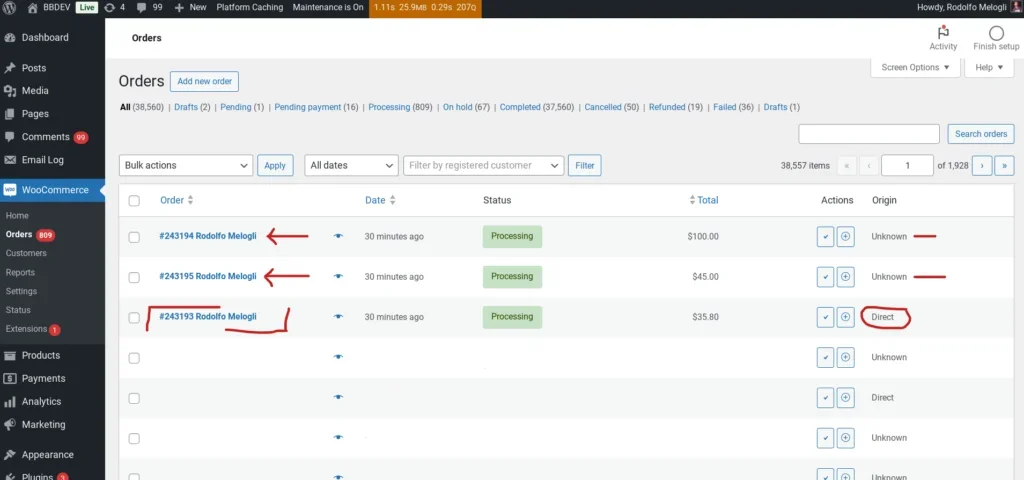
How to split an order at the time of purchase based on shipping category
Of course, you can also change the way you split the order, such as by product ID, product category, custom metadata information, etc. I chose shipping categories because there can only be one shipping category per product (or none, in which case the shipping category equals 0), and it's a very common situation.
add_action( 'woocommerce_thankyou', 'wprs_split_order_after_checkout', 9999 ).

function wprs_split_order_after_checkout( $order_id ) {

$order = wc_get_order( $order_id );
if ( ! $order || $order->get_meta( '_order_split' ) ) return;
    $items_by_shipping_class = array();

    foreach ( $order->get_items() as $item_id => $item ) {
        $product = $item->get_product();
$class_id = $product->get_shipping_class_id();
$items_by_shipping_class[$class_id][$item_id] = $item;
    }

    if ( count( $items_by_shipping_class ) > 1 ) {
foreach ( array_slice( $items_by_shipping_class, 1 ) as $class_id => $items ) {

$new_order = wc_create_order();
$new_order->set_address( $order->get_address( 'billing' ), 'billing' );
    if ( $order->needs_shipping_address() ) $new_order->set_address( $order->get_address( 'shipping' ) ? $order->get_address( 'billing' ), 'shipping' );

foreach ( $items as $item_id => $item ) {
$new_item = new WC_Order_Item_Product();
$new_item->set_product( $item->get_product() );
$new_item->set_quantity( $item->get_quantity() );
$new_item->set_total( $item->get_total() );
$new_item->set_subtotal( $item->get_subtotal() );
$new_item->set_tax_class( $item->get_tax_class() );
$new_item->set_taxes( $item->get_taxes() );
foreach ( $item->get_meta_data() as $meta ) {
$new_item->add_meta_data( $meta->key, $meta->value, true );
}
$new_order->add_item( $new_item );
$order->remove_item( $item_id );
}
$new_order->add_order_note( 'Splitted from order ' . $order_id );
$new_order->calculate_totals();
$new_order->set_payment_method( $order->get_payment_method() );
$new_order->set_payment_method_title( $order->get_payment_method_title() );
$new_order->update_status( $order->get_status() );

$order->calculate_totals();
$order->update_meta_data( '_order_split', true );
$order->save();
}

    }

}
Function Overview
Let's take the function that splits the order wprs_split_order_after_checkout mounted to WooCommerce's woocommerce_thankyou action hook on it. This means that once the order payment is complete and the user is redirected to the “Thank You“ page, the code to split the order will run.
- Check if the order has been split
- The function first checks if the order has been split (using the custom meta field _order_split). If so, the splitting process is skipped to avoid duplicates.
- Commodities grouped by transportation category
- The items in the order are traversed in a loop and grouped according to the shipping class (get_shipping_class_id). This is useful when you want to split an order based on different shipping methods or classes.
- Checking for the need to split
- If there are multiple shipping categories in the order, the order will be split into multiple smaller orders.
- Create new orders for each shipping category
- For each group of items in the shipping category (except the first group), a new order is created (wc_create_order).
- Billing and shipping addresses are copied from the original order to the new order.
- These items are cloned and the new order is populated with these items and all relevant details such as quantity, total price, taxes and metadata.
- Items in the original order are deleted after being transferred to the new order.
- Order remarks and totals
- A note has been added to the new order indicating that the order has been split from the original order.
- The total for the new order will be recalculated and the payment method will be copied from the original order.
- Identify original and new orders
summarize
The code in this article is ideal for situations where an order needs to be split into multiple smaller orders based on certain conditions, such as different shipping categories. It ensures that each new order retains the relevant details of the original order, such as billing/shipping address, payment method and product information. This is useful in situations such as substitute shipments or orders that need to be shipped separately.