Understanding WordPress Database Structure and Relationships between Tables
A properly functioning WordPress site consists of three main parts:
- Installed WordPress core data
- deposit
wp-contentCatalog of themes, plug-ins and uploaded multimedia content - The database, where everything we add to the WordPress dashboard is stored
Many WordPress users may never care about the WordPress database, or even realize that the posts they publish, the pages they post, the comments they make in their WordPress site, the menus they create in their dashboards it's all in the WordPress DatabaseWhen a user visits our site, the WordPress program reads the content from the database and populates it into the theme we use and returns it to the user.
In this article, I will take you through the following aspects of WordPress database in detail and this article will cover the following sections.
- present (sb for a job etc)
- Relationship between data
- Type of content
- user data
- metadata
- Custom taxonomies, categorized directories, labels and custom taxonomy items
- Comparison of custom taxonomies and article metadata
- Options Data Sheet
- WordPress Multisite Data
In this article, we will learn what data tables WordPress stores its different content in and how the various data are related.Content Types in WordPress.
Data tables are used to store content, and before we disassociate the data table, let's first understand the data types in WordPress, and then look at the WordPress data table will be better understood. In WordPress, there are some content types as follows:
- writings
- web page
- Custom Article Types
- attachment (email)
- grout
- Navigation menu items (saved as articles in the database)
The content types above have some additional data:
- categorized directory
- tab (of a window) (computing)
- Customized taxonomies and classifications
- Article metadata
In addition to these, there are a number of other types of data in Wordpress:
- gadget
- options (as in computer software settings)
- subscribers
- Site (in multi-site I)
- Hardcoded content (added in the theme or plugin)
- Called offsite data
All of the above content types are stored in one of the data tables in database one, they may be a complete piece of data on their own, or they may be part of another piece of data, or they may be linked to other data tables, e.g., data about articles may be linked to data about users so that we know who published a particular article.
WordPress Database Structure
WordPress uses interrelated database tables to minimize the amount of data stored - this creates a one-to-many relationship. That is, a user can have many posts, and in order to know which author posted a post, all you need to do is categorize the post and give it an author ID. This design saves a lot of database space and gives WordPress a lot of flexibility, as we can change user data at will without having to modify previously published posts.
The following diagram, reproduced from the official WordPress documentation, clearly shows how the data tables are related.
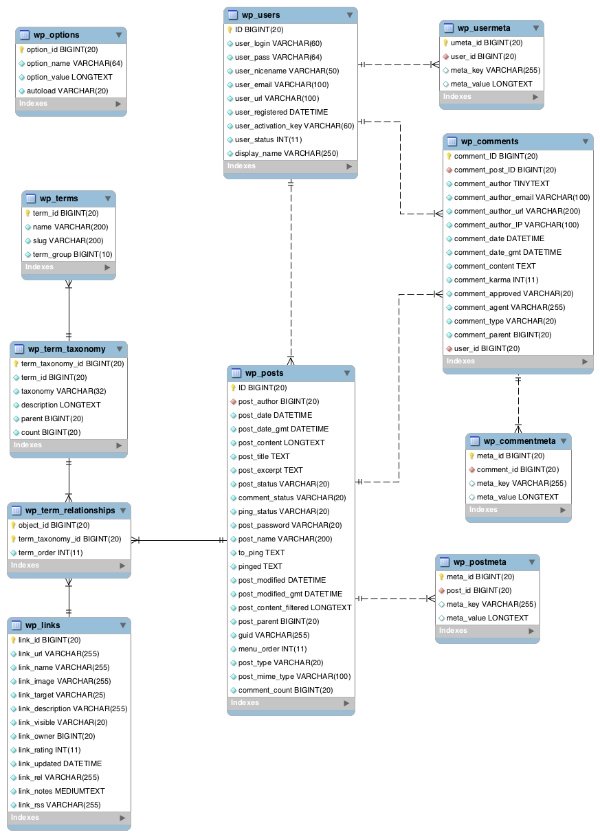
Most data tables are linked to one or more data tables through a field, this field is generally the only data of this data table, people familiar with the database must know that this data is the ID, such as a post_id of a certain article, these links are related to the following table:
| data sheet | Stored data | relate to |
|---|---|---|
wp_posts | Articles, pages, attachments, versions, navigation menu items | wp_postmeta (throughpost_idRelated)wp_term_relationships(throughpost_idRelated) |
wp_postmeta | Metadata for each article | wp_posts (through post_idRelated) |
wp_comments | commentaries | wp_posts (through post_id Related) |
wp_commentmeta | Comment metadata | wp_comments (throughcomment_id Related) |
wp_term_relationships | Relationship between articles and custom taxonomies | wp_posts (through post_id Related)wp_term_taxonomy (throughterm_taxonomy_id Related) |
wp_term_taxonomy | Custom taxonomies (including default taxonomies and labels) | wp_term_relationships(through term_taxonomy_idRelated) |
wp_terms | Associate to taxonomies with categories, tags and customized categories | wp_term_taxonomy (throughterm_id Related) |
wp_links | Blog Connect (abandoned and can be disregarded) | wp_term_relationships(through link_id Related) |
wp_users | subscribers | wp_posts (throughpost_author Related) |
wp_user_meta | Per-user metadata | wp_users (through user_id Related) |
wp_options | Site settings and options (via WordPress backend, theme, or plugin settings) | Stand-alone, not associated with any other data table |
Before we begin, there are a few things to keep in mind that need to be told.
- By default, data tables have a
wp_prefix, which can be changed during installation or through the configuration file. - The most central data table is
wp_posts data table, generally this data table one stores the most content, this data table associates almost everything together. - There is only one data table that is independent and not related to the other data tables, and that is the
wp_optionsData table, this data table is a key-value structure data table that stores some data about WordPress settings and caching. - There are two data tables that store this information about the custom article taxonomy, which we will explain in more detail later.
wp_usersrespond in singingwp_commentsThe datasheets are not related, even though you can specify which user posted a comment, the two datasheets are not actually related, the key is through the article.- Multi-site has some additional data tables, which are not the subject of this article, and we'll discuss them in more detail sometime in the future.
Linking content to a data table
Having understood the WordPress content structure and data tables, it's now time to put them into context. The table below shows which type of content each data table is used to store.
| Type of content | data sheet |
|---|---|
| writings | wp_posts |
| web page | wp_posts |
| Custom Article Types | wp_posts |
| attachment (email) | wp_posts |
| link (on a website) | wp_links |
| navigation menu | wp_posts |
| categorized directory | wp_terms |
| tab (of a window) (computing) | wp_terms |
| Customized Taxonomy | wp_term_taxonomy |
| Classified items | wp_terms |
| Article metadata | wp_post_meta |
| gadget | wp_options |
| Setting Options | wp_options |
| subscribers | wp_users |
| body of the article | wp_posts (if articles are added)wp_options (if gadgets are added)Theme and plugin files (hardcoded) |
| Other contents | wp_posts (if articles are added)wp_options (if gadgets are added)Theme and plugin files (hardcoded) |
You may notice that not all of the data tables appear in the table above, and in those that don't, there is no actual data stored, but rather, as auxiliary data tables, some relationships about that data are stored.
summarize
By the end of this article, I hope you have a better understanding of WordPress data types and how WordPress stores this data. In the next article in this series, I'll give you an overview of how WordPress data is related to each other and how data tables are related to each other.