How to Set Up WooCommerce Grouped Products to Maximize Your Sales
Product grouping is a common but effective strategy to increase sales. When we shop at the supermarket, a little bit of attention reveals that related or complementary products are placed close to each other on the shelves (e.g. salads and bulk vegetables next to each other). This makes it easier for shoppers to find the products they need and pick up an extra item or two.WooCommerce Grouping Products can help you accomplish this on your site.
This strategy allows you to offer your customers multiple related products on a single page. Here, customers can buy them as a group of products. They can easily buy the items they may need while you get extra cash.
In this article, I'm going to show you how to group products using WooCommerce. It will cover plugins you may want to use, tutorials on how to implement product grouping, and more. First, I'll go over the features in detail.
What are WooCommerce Packaged Products
A grouped product is essentially a combination of various products in a catalog that are similar or complementary to the main product.
Examples include printers, USB accessories and other items that go with computers and laptops. Combining these types of products together could mean a three-in-one laptop, advanced external mouse and printer.
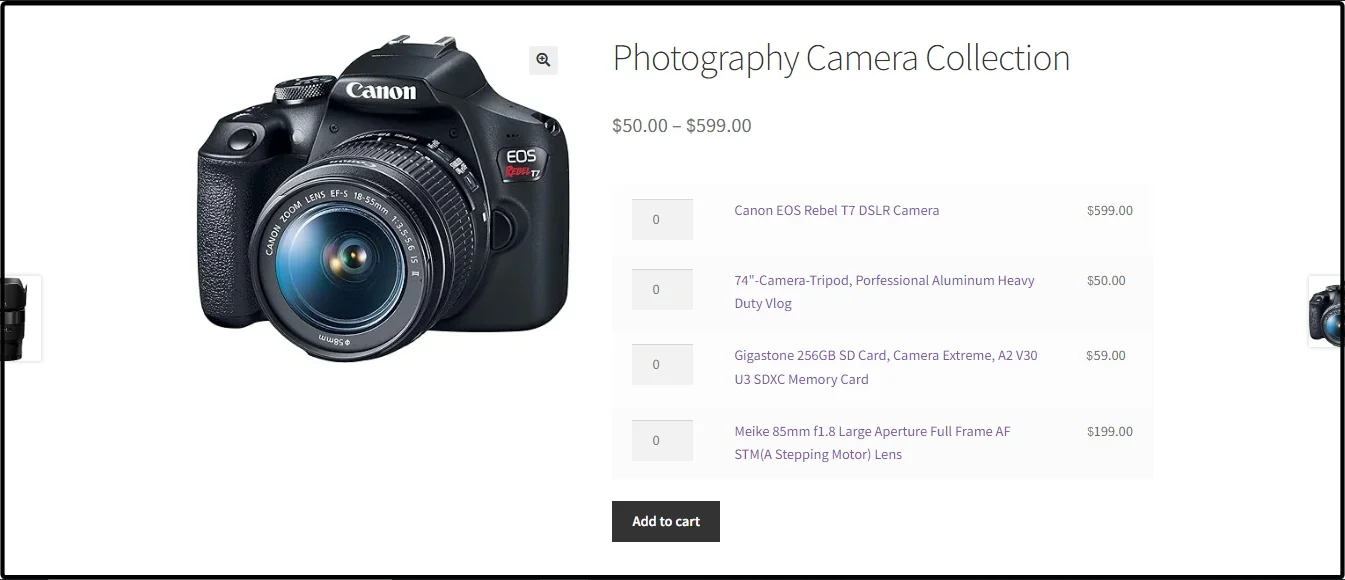
Customers have the autonomy to decide whether to add the product mix as a whole or in part, and how much of each product to order. Essentially, product combinations do not sell products together as a unit, but rather display related products together to provide buyers with choices.
When to use grouped products
The reason for using WooCommerce to group products is simple, because it works.study shows that, the way online products are displayed can influence buying decisions. This impulse trigger can get you more sales from your setup, especially from shoppers who want a more complete purchase.
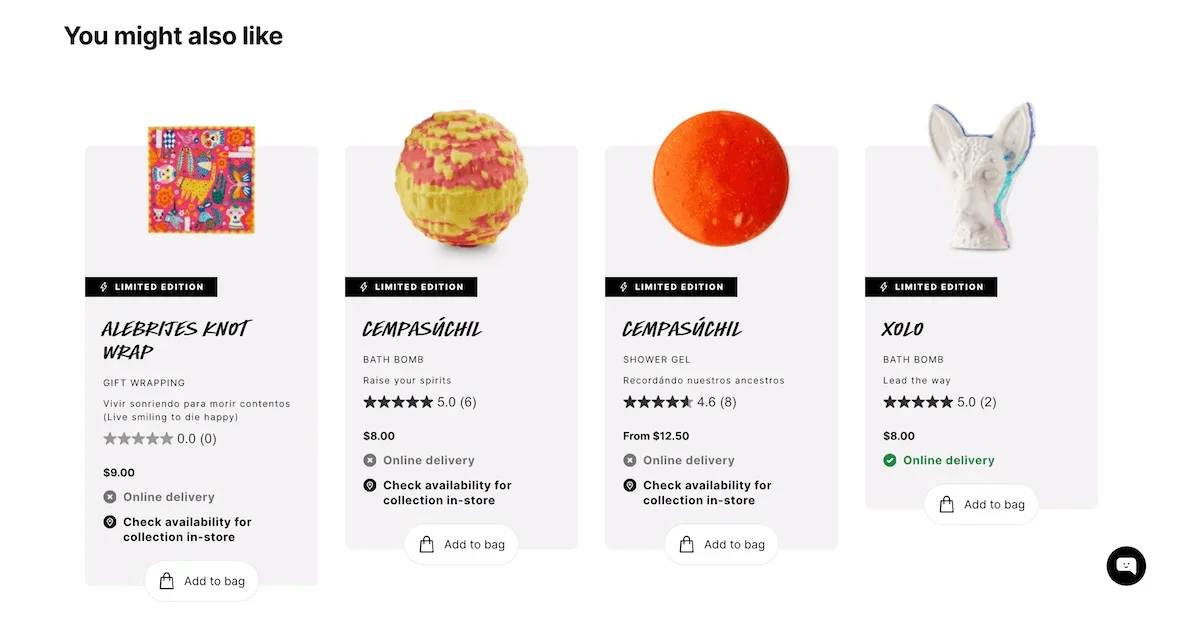 For example, the screenshot above is from the Lush Cosmetics website, where the product page shows related products to the main product and gives the customer the option to add the product to their shopping cart.
There are also many reasons to use WooCommerce grouping products:
- You have a related product for sale: For example, you might choose to offer five T-shirts as a grouped product, as this could entice customers to buy the bundle.
- Offer customizable kits or product lines: Gift baskets are effective in this regard. Consider offering a service that allows customers to create gift boxes with various combinations of related products.
The use of grouping provides customers with more choices and improves the user's shopping experience:
- Users don't have to navigate multiple pages to find products and can add multiple products to their shopping cart on one screen.
- They can make it easier to upsell promotions or seasonal offers. For example, you can create a holiday grouping that brings together items with the same theme.
- From a technical standpoint, WooCommerce's grouped products are search engine optimized (SEO) through internal linking.
Overall, this strategy encourages customers to purchase multiple items at the same time at a discounted price. However, the use of discounts is not necessary for product combinations. Next, I'd like to talk about this before moving on, because it's an important distinction.
Grouped products and product bundles
This may cause some confusion, but grouping and bundling are two different things. Here is a brief overview of the differences:
- Product bundling involves combining multiple products together and offering them to customers as a single bundle. This will likely involve a discount on the entire package. For example, you can get free batteries with the purchase of a flashlight.
- In contrast, product portfolios do not force users to buy products in a grouping or not.
The difference between the two is subtle, but grouping is simply a product relationship where the price of each product in the grouping is unique. Bundling, on the other hand, “forces” product options and quantities into the deal and offers discounts.
There are many benefits to bundling, such as reducing excess inventory, launching new products alongside older ones, etc., but we won't go into too much detail about this model here.
Quickly Compare Different WooCommerce Product Types
There are many different product types in WooCommerce, so it's important to understand the differences. This way, you'll be able to properly decide which type is right for your use case.
Here are some of the more common product types in WooCommerce.
| specificities | Simple Products | Variable Products | Grouped Products |
| Product Options | No change option | Multiple variation options | No change option, but combines multiple products together |
| typical example | Single products, such as books or T-shirts | One T-shirt in different sizes and colors | A set of kitchen utensils including cutlery, chopping board, knife and peeler |
| SKU | Only one SKU for the entire product | Each variant can have its own SKUs | Single SKU for the entire grouped product |
| prices | A fixed price for the product | Prices may vary for different variants | Prices for individual products within a group may vary |
| stockpiles | Manage the entire product | You manage the inventory of each variant | Each grouped product has its own inventory |
| sophistication | in simple terms | Increased complexity due to variants | Moderate complexity due to grouping |
As a result, you can clearly see when the different WooCommerce product types will be used. However, distinguishing and using these product types is not easy for beginners, and this is where the WordPress plugin comes in handy.
5 Plugins to Help You Build WooCommerce Grouped Products
WooCommerce grouped products are a “native“ feature of the eCommerce platform. I'll show you how to implement this feature later, but using a plugin will allow you to do this faster and with more power.
Here, I'm going to introduce five different plugins. After that, I'm going to show you how to create product groupings.
1. Product Bundles for WooCommerce

Product Bundles for WooCommerce is an “official“ extension that gives you more room to create product groupings. You'll be able to customize pricing if needed, and provide other product recommendations if you want to let customers make their own choices.
On a technical level, you have a built-in notification system that alerts you to low inventory levels across groups. It even provides analytics to help you understand the impact of product groupings.
Pricing:The annual fee is $79.00.
2. WooCommerce Product Options

WooCommerce Product Options is another product grouping plugin, but instead of grouping products, it focuses on providing customization options for products.
In addition to the default features of the WooCommerce product options, he is able to offer product groups in a flexible and extensive way. Customers can also customize it to suit their needs and finalize their purchase.
Pricing:Single site is $99 per year.
3.WPC Product Bundles for WooCommerce
WPC Product Bundles for WooCommerceAllows you to combine various products into groups or bundles, and the core functionality is free.
The plugin allows you to create product groupings using drag and drop and allows you to set default quantities for each item included. I love this because it takes the decision out of the customer's hands. These subtle barriers to purchase are also something that WooCommerce grouping products can help with.
WooCommerce offers basic customization options, but one option you'll probably use a lot is the location of the grouping dialog - it can be above or below the cart button, hidden or opened in a new tab.
prices The core functionality of both plugins is free, with single site license prices starting at $28 for the premium version.
4. Product Bundle Builder for WooCommerce

Product Bundle Builder for WooCommerce is another free plugin that enables product grouping. You can add individual products and variants, dynamic bundling and grouping, and more. These advanced types of product grouping can make a big difference in your sales numbers.
For example, composite product groupings can work well as a sales strategy. This may not be entirely within the focus of the article, but I do like the fact that you can offer your customers a way to build assembled products as well, such as computers.
Pricing: WooCommerce's Product Bundle Builder provides the core functionality for free, but the premium version for a single site is priced at $60.
5. Combined products
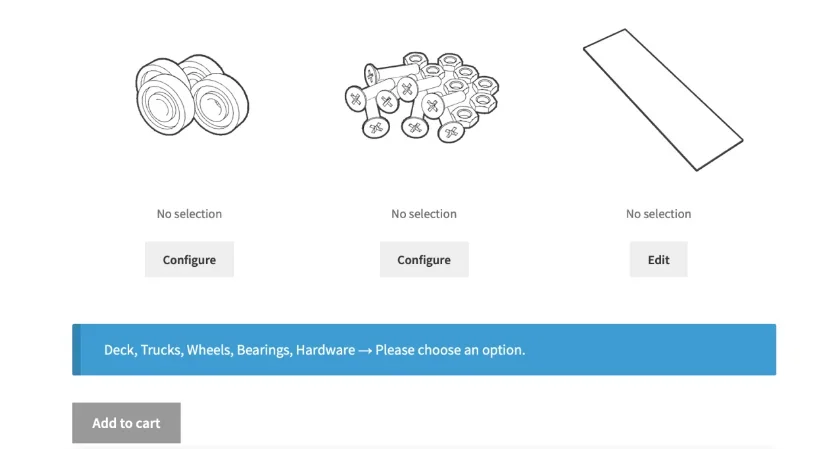
Speaking of composite products, the WooCommerce development team has a specialized plugin to make this happen.Composite Products for WooCommerce
Several grouping options are provided, with a focus on “Kits”. This could be building a computer to your personal specifications, purchasing custom jewelry or building your own custom bike. Of course, you can also put together composite products that fit your store's niche.
When building your product portfolio, you can do deep customization. For example, you can completely change the buying “flow” - which is critical to maximizing sales and user experience (UX). All in all, this is one of my favorite product grouping plugins for WooCommerce.
Pricing: An annual license fee of $149 applies to Composite Products for WooCommerce for a single site.
Step-by-Step Guide to Setting Up WooCommerce Grouped Products
Above are some of the plugins that helped us set up product grouping, here's how to group products using WooCommerce's default product grouping feature. First of all, you can only group existing products in your store, if any of the products you want to add to a group aren't already live in your WooCommerce store, you'll need to add them first.
1. Add a Single WooCommerce Product
To add a product, go to the WordPress dashboard under “offerings“>“Add New Product“Page:
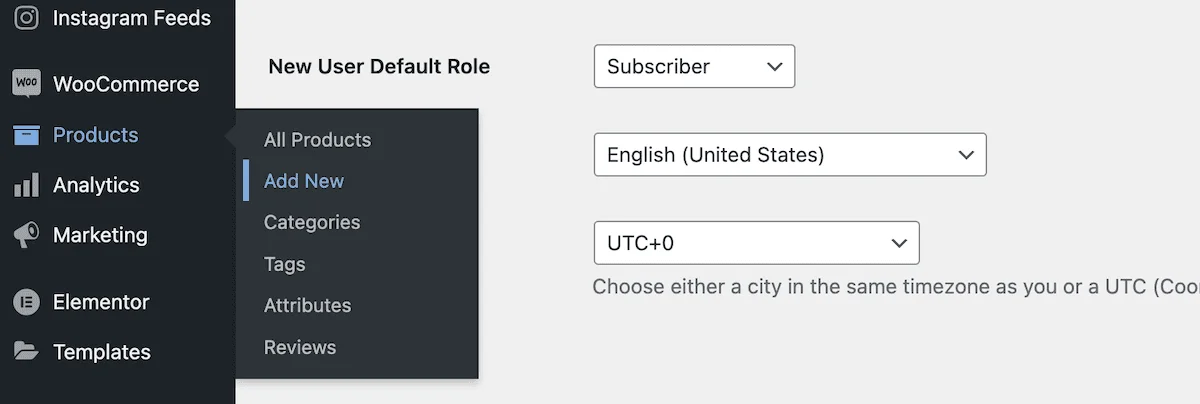
Here, fill in the product name and description and add product images. If you have multiple images, it's best to create a dedicated image gallery.
Here, scroll down to “Product Data“ meta table box, set the product type to “Simple Products“. Next, enter the price of the product and on the right side of the screen select the appropriateproduct category::
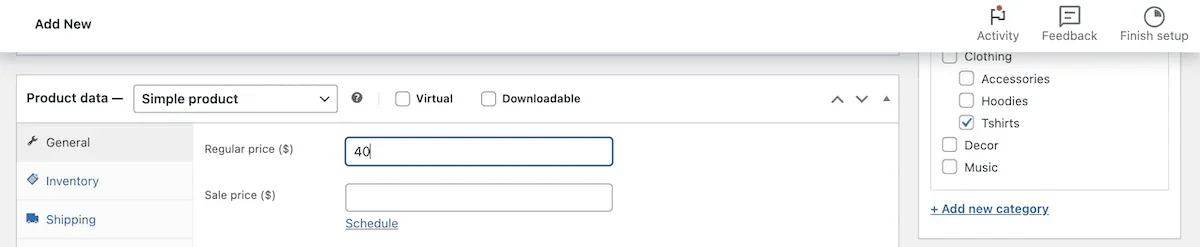
You can fill in any other details here, and when you're done, click thepostmaybe scheduleThe changes can be completed. Each product you want to add to the grouping needs to have a separate product page. Once you have that, you can start setting up the grouping.
2. Create grouped products and add individual products
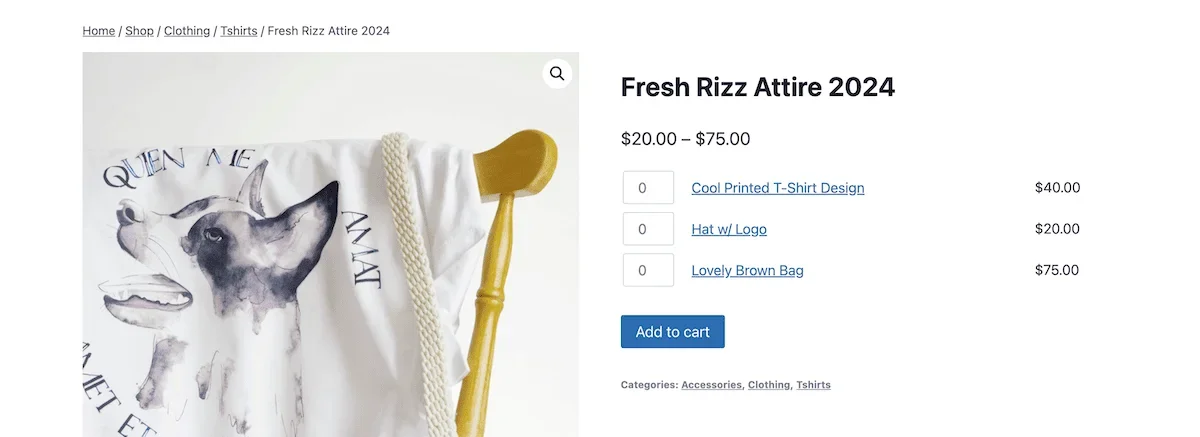
To create a WooCommerce grouped product, go again to “Products”>“Add New Product“Page. This time, fill in the details of the group itself. My example will use the Hats, Bags and T-Shirts product group:
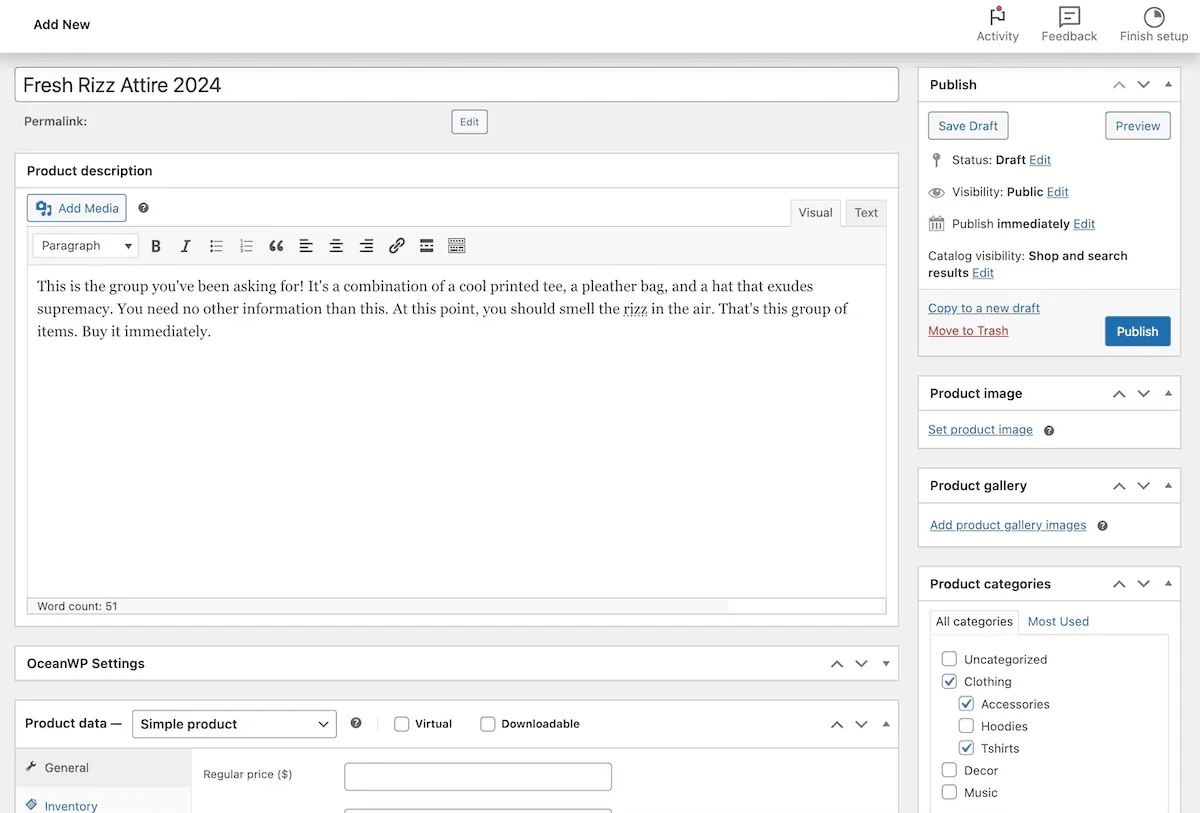
As for images, you can use images from existing products or upload new ones. Here, scroll down to “Product Data“ meta table box, click the drop-down menu and select “Grouped Products“:
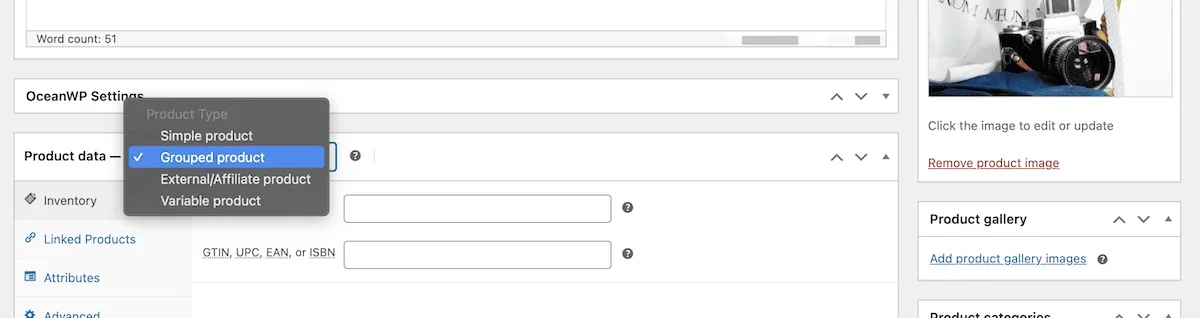
This will add a meta option to the “Related Products“Section. Here you can add products that belong to this group. To add a product, type the product name in the search box to find it:
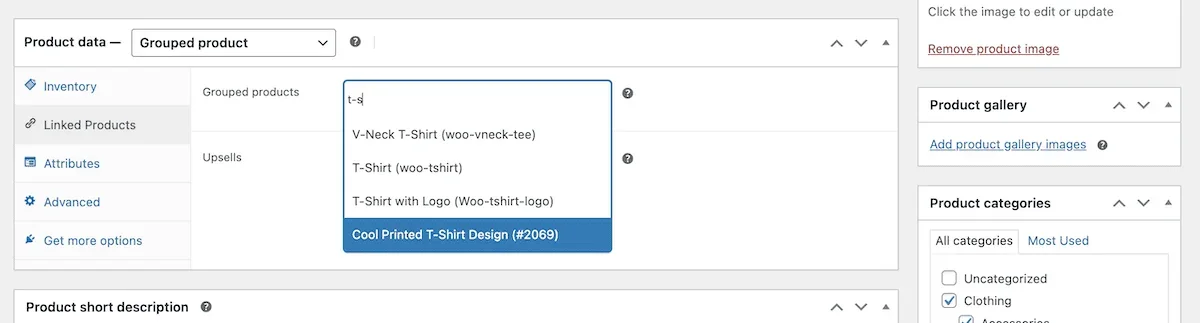
You can also add SKUs, attributes, and other data for grouped products here. When you are done, click “Posted “Save changes. If you head over to the front end, you'll see the WooCommerce Grouped Products page, as well as the individual products in that group:
Use the default method or use a plugin to add product groupings?
Setting up WooCommerce grouped products is one of the easiest tasks on the eCommerce platform. Even without a plugin, you can add a new grouping in a matter of minutes. If you only have a few product groups to add, using WooCommerce's default product grouping will be enough to get the job done, and you'll also avoid slowing down your site by adding too many plugins.
However, with the right plug-in, you can customize the grouping according to your needs. The plug-in method tends to provide a higher degree of customization and a quicker method of adding products than the default method. If you need to add more product groupings, it is a smarter choice to manage the product groupings through plug-ins.
What would you use the WooCommerce portfolio products for and which plugin do you like the look of? Feel free to post your opinions in the comments section below!