
Add Modified Date Data Column to WordPress Backend Post List and Support Sorting by Modified Date
WordPress background post list can be sorted by publish date, click date table header to switch the sorting direction, very convenient. We know that, similar to the release time, there is a modification time field in the WordPress post data table. Is it possible to display the "modification time" field inside the post list and make the post list support sorting by modification time? Of course it is possible, this article will introduce you to add the modification time data column to the list of posts, and make it support the function of click sorting.

添加「修改日期」数据列
First of all, we need to use the "manage_posts_columns" Hook to add the "Date Modified" column to the WordPress post list data table.
add_filter( 'manage_posts_columns', static function ( $cols )
$cols[ 'modified' ] = __( 'Modified Date' );

return $cols.
} );
After adding the Modified Date data column, we also need to tell WordPress what data to display in this column.
添加修改日期数据到新增的修改日期数据列
For this step, we need to use the "manage_posts_custom_column" hook to tell the WordPress list class how to display the data in the "modified" column.
add_action( 'manage_posts_custom_column', static function ( $column_name )
{
if ( $column_name === 'modified' ) {
echo get_post_modified_time( get_option( 'date_format' ), '', get_the_ID() ); }
}
} );
执行了上面两步之后,我们就可以在文章列表中看到「修改日期」这一列数据,显示的是文章的最新修改日期。
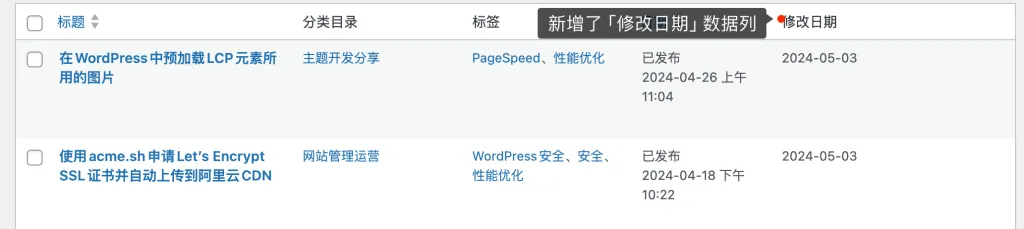
下面让我们需要再做一些处理,让修改日期这一列数据支持点击排序功能。
使修改日期数据支持点击排序功能
To make the modified date data support click sorting function, you need to use the "manage_edit-post_sortable_columns" Hook, the sample code is as follows.
add_filter( "manage_edit-post_sortable_columns", function ( $sortable_columns )
{
$sortable_columns[ 'modified' ] = [ 'modified', true, 'modified_date', 'sort_by_modified_date', 'desc' ];

return $sortable_columns;
} );
After doing this step, we just have the "Modified Date" column of data in the article list showing the UI that supports sorting, the sorting logic is not yet implemented.
点击修改日期排序时,执行排序处理
To implement the logic of sorting the list of articles by date of modification, we need to use the Hook "pre_get_posts", before executing the query to get the articles, modify the query to add the logic of sorting by date, the code is as follows:
add_filter( 'pre_get_posts', function ( $wp_query )
{
global $pagenow;
if ( is_admin() && 'edit.php' == $pagenow && wprs_input_get( 'orderby' ) === 'modified' ) {
$wp_query->set( 'orderby', 'modified' );
$wp_query->set( 'order', wprs_input_get( 'order' ) );
}
} );
After performing the above steps, we can make the WordPress post list sorted by modification date.
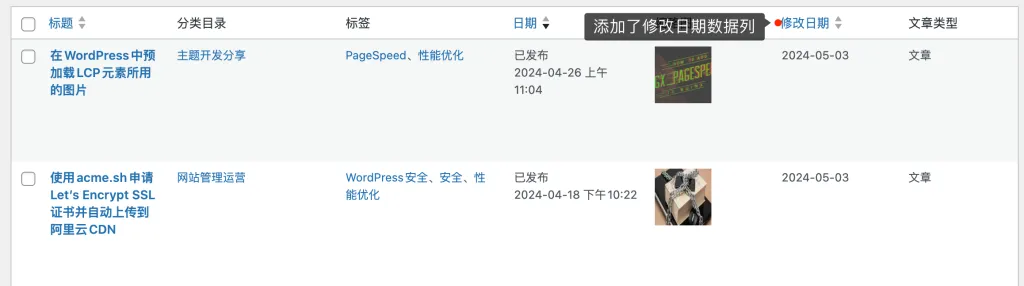
本站之前的文章WordPress Show Post Word Count Data Column in Backend Post List Page 中介绍了添加文章字数数据列的方法,但是并不支持按照文章字数排序的功能,有兴趣的朋友可以参考本文的方法为其添加按照文字数排序的功能。