Getting Product Variants Programmatically in WooCommerce
在 WooCommerce 中,我们使用产品变体一般是在产品编辑器中设置,然后在产品页面中展示,这对于熟悉 WooCommerce 操作的人来说,都是很容易的操作。但是对于我们开发者来说,怎么以变成的方式获取产品变体,却是一个不常见的操作。在本文中,我将我大家介绍怎么用编程的方式获取产品变体,以遍进一步的处理。
让我们假设,在下面的示例中,$product 是一个 WC_Product 产品对象,或者更具体地说,是一个 WC_Product_Variable 变量,我们可以在使用 WooCommerce 钩子或借助 wc_get_product() 函数时将其作为参数获取。
但如果你不确定 $product 对象是否属于产品变体,也可以使用 if( $product->is_type( 'variable' ) ) 条件来判断。
方法 1. get_available_variations()
$variations = $product->get_available_variations();

if( $variations ) {
	foreach( $variations as $variation ) {
		// a WC_Product_Variation object

		echo $variation->get_id(); // 特定变体的 ID
		echo $variation->get_name();
	}
}
这种方法看上去正是我们所需要的,但是有一个小问题 —— 它只适用于可见的库存变量,也就是说,勾选了 “已启用 “复选框的变体才能通过这个函数获取到。
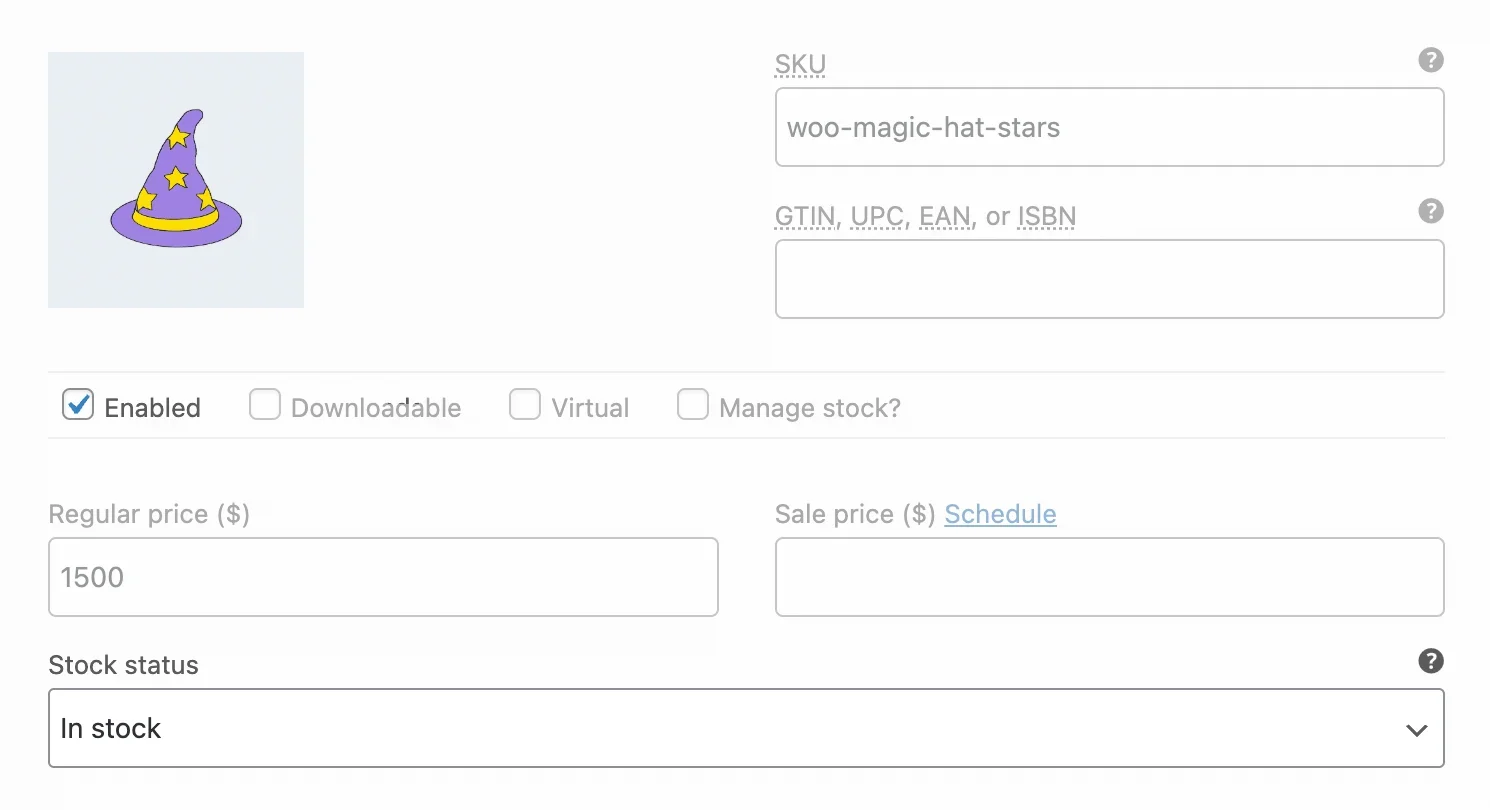
我们可以使用 get_available_variations()方法只获取已启用的库存变体。
如何使用 get_available_variations() 获取所有变量
正如我之前提到的,get_available_variations()只返回有库存且未隐藏的变体。有没有办法绕过这一点?答案是有的。
如果我们在 WooCommerce 设置中取消勾选此复选框,就可以允许此方法返回缺货变体::

该复选框可在 WooCommerce > 设置 > offerings > 库存 中找到。
其次,我们还可以使用过滤器钩子 woocommerce_hide_invisible_variations,使 get_available_variations()方法也能返回隐藏(未启用)的变化:
add_filter( 'woocommerce_hide_invisible_variations', 'wprs_all_variations', 25, 3 );

function wprs_all_variations( $hide_invisible, $variation_id, $variation ) {
	// 我们还可以在此处添加一些特定于变体的条件
	$hide_invisible = false;
	return $hide_invisible;
}
或者简化版本
add_filter( 'woocommerce_hide_invisible_variations', '__return_false' );方法 2. get_children()
我们上面讨论的 get_available_variations()方法是就在 get_children() 方法的基础上工作的。
但是,如果你需要同时获取 WooCommerce 产品的隐藏和可见、库存和缺货变体,get_children()方法可能会更适合你。你只需要记住一点—— 它返回的是一个变体 ID 数组,而不是对象。
$variation_ids = $product->get_children();

if( $variation_ids ) {
	foreach( $variation_ids as $variation_id ) {

		$variation = wc_get_product( $variation_id );
		if ( ! $variation || ! $variation->exists() ) {
			continue;
		}

		echo $variation->get_id();
		echo $variation->get_name();
	}
}
方法 3.在 WooCommerce REST API 中获取产品变体
除了上面的两种方式,我们还可以通过使用 WooCommerce REST API 来获取产品变体,只不过这种方法有点绕,明明可以通过 PHP 从数据库中直接获取,这种方法确多了一个 HTTP 请求,对性能也会稍有影响,如果不是有特别的需求,不建议使用这种方法。
$url = '';
$username = '';
$pwd = ''; // 应用密码,而不是 WordPress 登录密码

// 发送请求以获取 WooCommerce 中的产品变体
$response = wp_remote_get(
	add_query_arg(
		array(
			'per_page' => 100, // 默认为 10
			// 'status' => 'publish', // 只获取启用的变体
			// 'stock_status' => 'instock', // 只获取有库存的变体
		),
		"{$url}/wp-json/wc/v3/products/{$product_id}/variations"
	),
	array(
		'headers' => array(
			'Authorization' => 'Basic ' . base64_encode( "{$username}:{$pwd}" )
		)
	)
);

// 可以在这里检查服务器返回代码和内容后再继续操作
$variations = json_decode( wp_remote_retrieve_body( $response ), true );
if( $variations ) {
	foreach( $variations as $variation ) {
		echo $variation[ 'id' ];
		echo $variation[ 'sku' ];
	}
}
让我来解释一下这段代码:
- 如你所见,我使用的是 WordPress HTTP API 函数——
wp_remote_get()。 - 要进行身份验证,你需要提供用户名和应用程序密码。
- 请注意
per_page参数,因为它的默认值是10,这意味着如果你的产品有很多变体,你就无法在一次 REST API 请求中获得所有变体。
如果对本文有任何的问题或想法,欢迎在评论区中提取,我们一起讨论研究。