

Modify WP-Pagenavi style to Bootstrap Digital Pagination Navigation Style
WP-Pagenavi is arguably the most popular pagination plugin in WordPress. The WP-Pagenavi plugin comes with a basic CSS style, which we can modify by customizing the CSS. If your theme is customized based on Bootstrap, can't we just use Bootstrap's digital pagination style? Comparing the HTML structure of WP-Pagenavi and the HTML structure of Bootstrap Numeric Pagination component, we find that their structures are different. In order to use Bootstrap pagination styles, we just need to modify the pagination structure of WP-Pagenavi to be the same as that of the HTML structure of Bootstrap Numeric Pagination component. To use Bootstrap's pagination style, you just need to change the pagination structure of WP-Pagenavi to the same as the HTML structure of Bootstrap's digital pagination component.
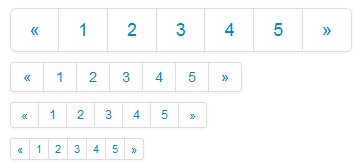
WP-Pagenavi provides us with wp_pagenavi filter function for us to modify the HTML content of WP-Pagenavi pagination, with this filter function, everything becomes much simpler.
// mount custom function to wp_pagenavi filter function
add_filter( 'wp_pagenavi', 'ik_pagination', 10, 2 );
// Customize the html structure by replacing it with a string before outputting it
function ik_pagination($html) {
$out = '';
//wrap a's and span's in li's
$out = str_replace("<div","",$html);
$out = str_replace("class='wp-pagenavi'>","",$out);
$out = str_replace("<a","<li><a",$out);
$out = str_replace("</a>","</a></li>",$out);
$out = str_replace("<span","<li><span",$out);
$out = str_replace("</span>","</span></li>",$out);
$out = str_replace("</div>","",$out).
return '<div class="pagination pagination-centered">
<ul>'.$out.'</ul>
</div>';
}If your Bootstrap is Bootstrap3, just modify the output slightly.
return ''.$out.'
';Put the above code into functions.php, the pagination HTML output by WP-Pagenavi will be exactly the same as Bootstrap's, because we use Bootstrap's pagination styles, WP-Pagenavi's own pagination CSS styles won't be used, and we can disable it in WP-Pagenavi's settings. We can disable it in WP-Pagenavi settings.
WiseGuy comment: Bootstrap is such a popular front-end framework, if WP-Pagenavi can provide support for Bootstrap styles, you only need to check Bootstrap support in the background to realize the effect in this article, the user experience is undoubtedly increased a lot.





can
Nice and usable.
Have fun with it!