How to Block External Requests in WordPress Solve Slow Opening Backend Problems
In WordPress, the default kernel, theme, and plugin updater regularly requests wordpress.org to check for new versions, and some advanced themes and plugins also request their own API servers to verify that the authorization code is valid. These requests are important to ensure the integrity of the WordPress experience, but sometimes the target servers are slow to respond, and these requests can slow down the opening of WordPress pages (especially backend pages) and ruin the WordPress experience.
To solve this problem, we can block these external requests so that we can avoid these slow requests from affecting the opening speed of WordPress.
How to block external requests in WordPress
WordPress provides us with a constant WP_HTTP_BLOCK_EXTERNAL to do this, we just need to add a new value in the wp-config.php Add the following settings to block all WordPress external requests.
define( 'WP_HTTP_BLOCK_EXTERNAL', true );After adding the above code, all WordPress outgoing connections will be blocked, including connections to wordpress.org, and the WordPress kernel, theme and plugin update functions will be unavailable, so it's not particularly necessary to try not to block external requests through this method. We can use other methods to block some of the external requests.
允许部分外部请求
With the WP_ACCESSIBLE_HOSTS constant, we can set up to allow WordPress to send requests to some domains, in this constant we can set up multiple domains separated by commas, or a set of domains using wildcards, sample code is below.
define( 'WP_ACCESSIBLE_HOSTS', '*.wordpress.org,www.some-api.com' );In this way it is equivalent to setting up a whitelist of externally requested domains for the WordPress program, and only domains in this whitelist are allowed to be accessed by the WordPress program.
Use the Snitch plugin to block external requests
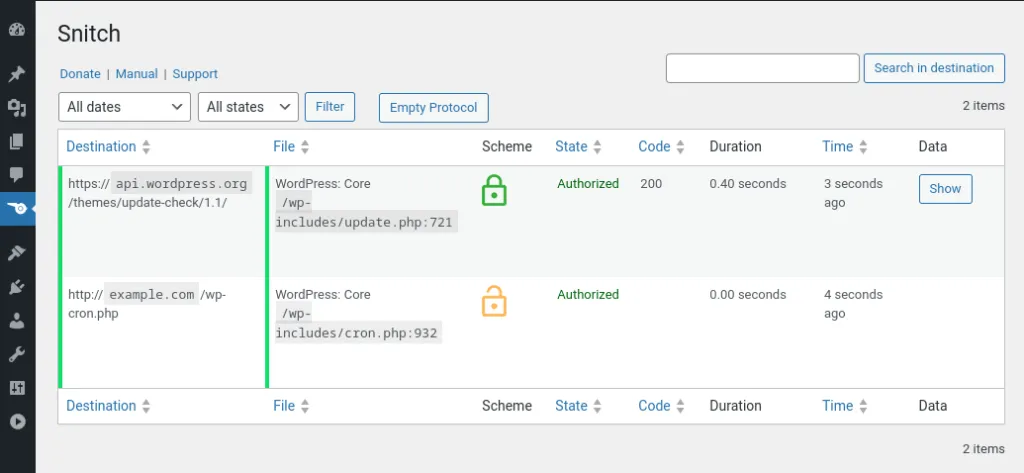
If you don't like editing code and are more accustomed to the plugin approach to customizing WordPress, there is a plugin called Snitch 的插件可以帮我们阻止外部请求。
As shown in the figure below, this plugin helps us to list all the external requests in WordPress and shows the time consuming to access this external request, we can target to block the external request which takes particularly long time.
局限性和解决办法
The methods described above for blocking external requests using constants or plugins are convenient, but only apply to HTTP classes that use WordPress (including the wp_remote_get,wp_remote_post (function) request external resources, if you use a custom request method including curl or other HTTP request libraries, this method will not work, in order to maximize the prevention of WordPress access to external resources, it is recommended to set up a firewall on the server to achieve.