WP User Manager Add custom pages to My Account page and Profile page
WP User Manager pluginis a simple and powerful front-end user center plugin, in addition to the default rich functionality, this plugin also provides us with a number of Hooks, which can be convenient for us to add custom pages to my account page and profile. Here we see how to add a simple custom page to my account page and profile page.
First add a custom Tab
First, by wpum_get_account_page_tabs This Filter modification $tabs array, in the following code, we have added an 'application' data on top of the original array.
add_filter('wpum_get_account_page_tabs', function ($tabs)
{
    $tabs[ 'application' ] = [
        'name' => esc_html__('Submit Application', 'wp-user-manager'),
        'priority' => 0,
    ];

    return $tabs.
});
Once you've added it, go back to the Account page on the front end of WP User Manager and you'll see that there is an additional Application tab on the Account page.
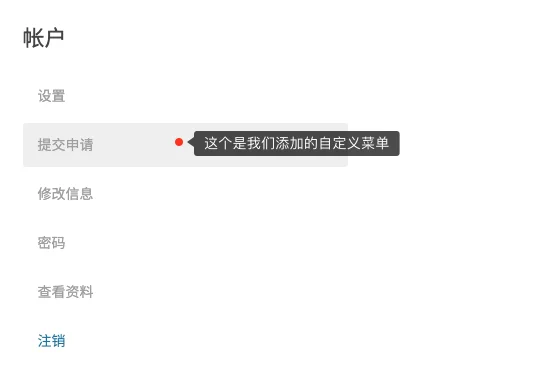
But for now, when you click on this tab, there's a blank piece on the right side, because we haven't added content to this new custom page yet. Next, let's add content to this blank piece.
Adding content to a custom page
To add content, we use the wpum_account_page_content_$active_tab This Action, when using it, we need to set the $active_tab This variable is replaced with the "application" array key added above.
In the following code, we display the output of the shortcode "wpzhiku_my_posts" on this page.
add_action('wpum_account_page_content_application', function ()
{
    echo do_shortcode('[wpzhiku_my_posts]');
}).;
With the above two Hooks, we can add as many custom pages as we want to the account page of WP User Manager to realize the user page we need.
Adding a custom page to the profile page
Similar to the Add to Account page, we can use the wpum_get_registered_profile_tabs respond in singing wpum_profile_page_content_$active_tab These two Hooks add custom pages to the profile page. Below is the code example.
add_filter('wpum_get_registered_profile_tabs', function ($tabs)
{

    $tabs[ 'application' ] = [
        'name' => esc_html__('Submit Application', 'wp-user-manager'),
        'priority' => 5,, .
    ];

    return $tabs.
});


add_action('wpum_profile_page_content_public_files', function ($data, $active_tab)
{
    echo 'This is application content.
}, 10, 2);
In addition to the four Hooks introduced in this article, in fact, the WP User Manager plugin also provides us with a wealth of other Hooks, we can find the relevant Hooks according to the needs of the development of the project, we will not be introduced in this.