WordPress Backend Post List Add Custom Field Filter Items
In the use of WordPress development news theme or CMS theme, we often have to set the position of the article needs, generally we customize the field to achieve the following figure, we realize the need for the home page and classification of separate set of top articles, the operation is very simple, if you need to set the article on top, check the appropriate top position on it.
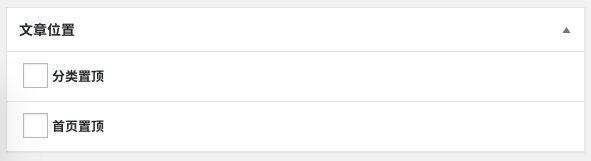
After setting the top article, if we need to cancel the top article, the quicker way is to find the article in the foreground, then click the edit link, then cancel the top check box, then save the article, so much then, it is really troublesome to operate. If we want to count the total number of top articles, what is the operation? You can imagine.
In the previous article on this siteAdd Custom Field Filter Filter Criteria to WordPress Backend Post ListIn "Top Articles", I introduced how to filter articles by adding a drop-down filter item. If you can add a top article filter item in the background, similar to the default article status and top filter, you can directly display the number of top articles, and click the link to directly filter out the top articles, isn't it much more convenient?
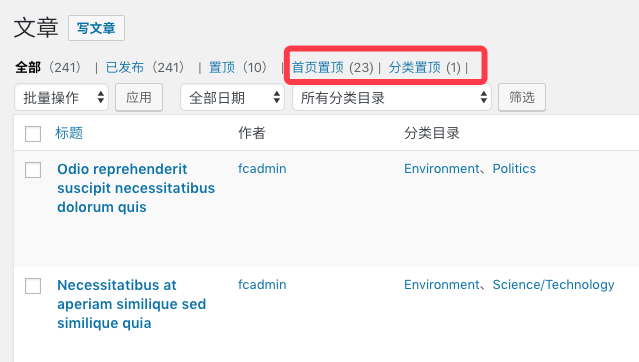
We looked into the WordPress post list code and found that there are Filters that can help us realize this need. Here's the code that accomplishes this.
The first step, add category top and home page top filter links
Add category top and home page top filter items to the article type filter item. This step is just to add the top article filter, click the filter link does not have any effect, we need to modify the background article query to filter out the top article.
add_filter('views_edit-post', function ($views)
{

    $views[] = '<a href="/en/' . add_query_arg('position', '_featured_in_category') . '/">sticky (of a webpage)</a>';
    $views[] = '<a href="/en/' . add_query_arg('position', '_featured_in_home') . '/">Home Page Top</a>';

    return $views.
}).;
Step 2: Add top article query parameters to the query object to filter articles
According to the query string in the filter link clicked by the user, add query parameters to the background article list query object to achieve the purpose of filtering articles.
add_filter('parse_query', function ($query)
{
    global $pagenow;

    if (is_admin() && 'edit.php' == $pagenow && isset($_GET[ 'position' ]) && $_GET[ 'position' ] != '') {
        $position                            = $_GET[ 'position' ];
        $query->query_vars[ 'meta_key' ]     = $position;
        $query->query_vars[ 'meta_value' ]   = 'yes';
        $query->query_vars[ 'meta_compare' ] = '=';
    }

    return $query;
});
Finally, the number of articles counted
completed the above two steps, in fact, can already be realized in the background list of articles to filter the purpose of the article, the following function, is used to count the total number of articles of a “meta_key” for “yes”, we can use this function for the We can use this function to add the function of counting the total number of articles in the top article filter link in the first step. Add the function to the first step in the appropriate location on it.
/**
 * Query the number of articles in a location
 *
 * @param $position
 * @param
 * @return int
 */
function wprs_count_position_post($position)
{

    global $wpdb;
    $query = $wpdb->get_results("SELECT SQL_CALC_FOUND_ROWS wp_posts.ID
    FROM wp_posts
    INNER JOIN wp_postmeta
    ON (
        wp_posts.ID = wp_postmeta.post_id
    )
    WHERE 1=1
    AND (
        ( wp_postmeta.meta_key = '$position' AND wp_postmeta.meta_value = 'yes' )
    )
    AND wp_posts.post_type = 'post'
    AND (
        wp_posts.post_status = 'publish'
        OR wp_posts.post_status = 'pending'
        OR wp_posts.post_status = 'draft'
        OR wp_posts.post_status = 'future'
        OR wp_posts.post_status = 'private'
    )
    GROUP BY wp_posts.ID
    ORDER BY wp_posts.post_date DESC").

    return count($query);
}
In addition to the above, we can also add the function of setting the top article to the article list or quick edit, so that the operation of setting the top article is more convenient and fast. However, this does not belong to the scope of this article, so we will leave it aside for now. If you need it, you can study it by yourself.