WooCommerce Disables Orders From Blacklisted Email Addresses
Sometimes, in order to prevent fraudsters, users who violate the site's usage policy, or certain risky users from placing orders on the WooCommerce site, we need the order information submitted by a user to group certain users from placing orders. Thanks to WooCommerce's flexible Hook, we can easily fulfill this requirement.
In the code below, we customize the function to add a simple email blacklist that will check the customer's email at checkout.只You need to add this to your theme's functions.php file8 lines of PHP codeThis will effectively block orders from specific email addresses.
add_action( 'woocommerce_after_checkout_validation', 'wprs_blacklist_billing_email', 9999, 2 );

function wprs_blacklist_billing_email( $data, $errors ) {
$blacklist = [ 'hello@example.com', 'info@lorem.io', 'me@john.co' ]; }
if ( in_array( $data['billing_email'], $blacklist ) ) {
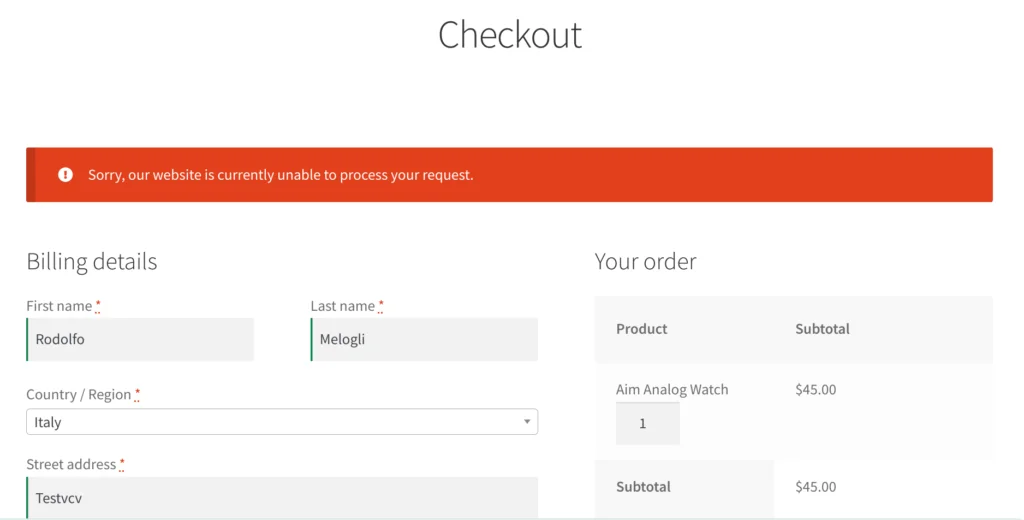
$errors->add( 'blacklist', __( 'Sorry, our website is currently unable to process your request.', 'bbloomer' ) );
}
}
In addition to based on email, we can also do some judgment based on the user's submitted shipping address, for example, if the user's shipping address is a high-risk area, we can directly prevent this user from placing an order in order to maximize the risk of avoidance.