7 Best WordPress Translation Plugins for Building Multilingual Websites in 2025
For better accessibility and to enter new markets, those who build e-commerce websites want to add a multi-language feature to their website, and there are many multi-language plugins available, which one is suitable for your website and business? Don't worry, in this post, I will take you through six of the best WordPress translation plugins to choose from. Whether you want automatic translations, manual translations or professional translations, these plugins can help you.
I. WeGlot
Weglot is one of the most popular multi-language plugins for WordPress and offers you great flexibility in translating your WordPress website. Depending on your budget and requirements for accuracy, Weglot offers you three easy ways to translate your website:
- machine translation: The easiest and fastest way. But since it is done by a machine, you cannot 100% trust its accuracy.
- human translation: Translate the site using a cloud-based .po file or a visual editor. It's good if you know the language, but it can be time-consuming.
- professional translation: Easily hire a professional to translate your content, and the finished translation is automatically added to the translated version of your website. It's more expensive, but accurate and time-saving.
Weglot's interface is very easy to use and all translations are optimized for search engine optimization. In terms of ease of use, Weglot is definitely the best translation plugin on this list. However, Weglot has two drawbacks:
- If you need the premium version, you'll need to pay monthly instead of a one-time payment.
- You need to use Weglot's cloud interface for translation. I don't mind this, but some people may not like leaving the WordPress dashboard.
prices: up to 2,000 words free of charge, after that, from 9.90 euros per month.
II.WPML
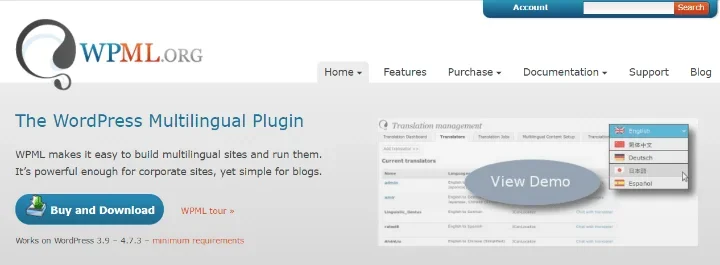
WPML, also known as the WordPress Multilingual plugin, is one of the oldest translation plugins. It has been released since 2009 and has been updated ever since.
First of all, like any good translation solution, it translates every string on WordPress. This means it includes custom post types, taxonomies, menus, theme text ......All content。
If you don't want to translate content manually, WPML also connects to professional translation services and easily adds content from these services to your website.
Until now, WPML has been nothing special. But when you use the WPML Multilingual CMS package, things start to get pretty cool.
First, you can add new WordPress users and assign them the “Translator” role. These users can then submit translations. So, paired with the right incentives, you can basically crowdsource your site's translations.
In this version, WPML also integrates with e-commerce solutions to create multilingual stores.
However, WPML has some drawbacks:
- There is no free version.
- There is no machine translation solution, which will be a problem in 2025 when AI translations are maturing and accuracy is already comparable to human translations.
prices: $25 for the multilingual blog version. The multilingual CMS version (the coolest one!) is $79.
III. Polylang
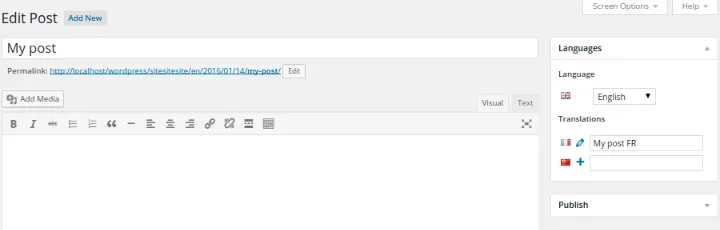
Polylang is another popular WordPress translation plugin. It's lightweight and easy to use, but the out-of-the-box feature set isn't as robust as the previous plugins, and we needed some settings to get him up and running.
First, you'll add a new language switcher to the WordPress post editor. With it, you'll be able to create different versions of posts (essentially different translations) and assign each version to a specific language.
You can also translate all generic strings in Polylang's interface. What do I mean by generic strings? Things like your site title, date format, and other options that are displayed globally on your site.
So far, so good.But so far, you have to do all the translation manually. What if you want to add machine translation or professional translation?
Polylang alone won't do it.. .....However, if you install the Lingotek Plugin As an add-on to Polylang, theachievable this point 。 With Lingotek, you can manage automatic and professional translations and synchronize them with Polylang.
It's not a perfect solution, but it gets the job done.
Polylang is a good choice, its free basic features are enough to implement a basic multilingual website with no limit on the number of languages, and for more advanced features, the price of 99 cents per year is not too high. The interface may not be as good as Weglot, but once you get the hang of it, it's pretty easy to use.
prices: Free
IV. qTranslate X
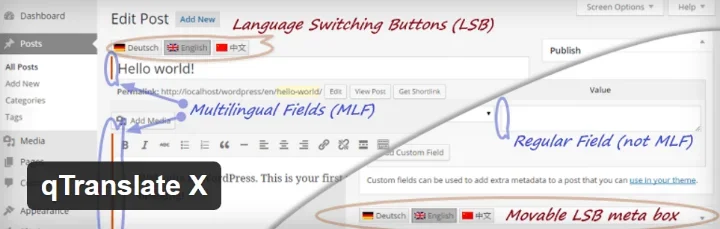
With 100,000+ active installs and a 4.8-star rating, qTranslate X deserves its place on the list of best WordPres s translation plugins.
Similar to Polylang, qTranslate X adds a language switching field to the WordPress editor, allowing you to quickly create translated versions of posts.
It also includes search engine friendly URLs and can generate language specific sitemaps using Yoast SEO.
Honestly, it's a perfectly good solution. But I don't see any reason to choose it over Polylang. as far as I can tell, it doesn't do abetterThe first is that it has two drawbacks compared to Polylang:
- It can't be synchronized with a translation service.Polylang's method of synchronizing with Lingotek isn't perfect, but at least it exists.
- It doesn't provide you with an easy way to translate the global strings used on WordPress sites.
I've included it because it's free and undeniably popular, but I think you're better off using the equally free (and even more popular) Polylang plugin.
prices free (of charge)
V. TranslatePress
TranslatePress is a new alternative between Weglot and Polylang/WPML.
Like Weglot, it supports both languages:
- manual translation
- Automatic translation is done through the Google Translate API, and the advanced version supports automatic translation using DeepL and the plugin's own translation service.
It also lets you do 100% translations of websites and gives you a user-friendly visual translation interface based on the native WordPress customizer.
Basically, you open up this visualization and you can
- Click on a text string or block in the live preview to edit it directly. (Similar to the operating logic of the WordPress customization tool)
- Use the Next/Previous buttons to systematically navigate through all the strings on the page.
- Directly searches text strings.
This interface also lets you translate behind-the-scenes metadata, such as your Yoast SEO description or social media open icons.
TranslatePress is quite different from Weglot in that it is100% Self-hosted. This means that all your translations are stored in your own database and you don't need to rely on external interfaces. You also don't need to pay an ongoing monthly fee, it uses the traditional WordPress plugin billing method.
Overall, it's a good choice if you want a product like this:
- Thorough translation, i.e. it allows you to translate all the small themes and plugins strings on the site.
- user-friendly interface
- self-hosted
- Good for search engine optimization(Professional version only)
WordPress.org offers a limited free version. However, if you are very focused on search engine optimization and/or need translations into multiple languages, you will need the Pro version.
prices: Limited free version. Starting at 79 euros for the Professional version
VI. MultilingualPress
MultilingualPress takes a unique approach to WordPress translation; instead of translating content within an existing website, MultilingualPress uses WordPress multisite to create separate installers for each language.
MultilingualPress then provides you with a lightweight user interface to connect to all these sites.
You can create unlimited relationships between websites using MultilingualPress. For example, if your main website is in English, you can tell MultilingualPress to connect it to separate Multisite installations in Spanish and German.
Although there are multiple installations using this method, you don't actually need to switch sites to edit the translations.MultilingualPress' interface allows you to edit all translations in the same original post editor, which is quite convenient.
What's the benefit of this?Mainly, if you need to deactivate MultilingualPress, your translated content won't disappear like it does with most other translation plugins. You will lose the interface that makes it easy to manage your translated content.But you won't lose the actual translated version of the site.This means that there will be almost no locking.
In addition, this is helpful for search engine optimization because Google can easily index the fully translated version of a website.
I realize you may be asking now:If each translation is a separate site, what about my themes and plugins? Don't worry - MultilingualPress has a feature to synchronize theme and plugin settings across all translated sites.
Currently, MultilingualPress supports more than 174 languages.
Honestly, I like this approach. If you're a WordPress beginner, you might find it overly complicated, but if you already know WordPress like the back of your hand, MultilingualPress gives you a lot of flexibility.
prices Free, with the option to pay for premium support.
VII. Google Language Translator

Finally, I'm going to introduce a plugin that is far less feature-rich than all the previous plugins. It is simple and does only one thing:
Add Google Translate tool to your WordPress website. But if that's all you need, then it's a great option because it's super lightweight compared to other tools.
You can add translation shortcodes to individual posts/pages or make them globally available via widgets.
Keep in mind, though, that if you translate in this way, your site will not be search engine optimized. And since it is machine translated, your translated content may not make sense.
But if you don't want to invest a lot of time, this is definitely the quickest and easiest way to add translations to your website.
prices free (of charge)
Which WordPress translation plugin should you choose?
if younot bad for moneyI think.Weglotis the best choice. It gives you great flexibility in how you handle translations. You can easily use machine translations, human translations or professional translations ...... can also combine between the three as needed. It is very search engine optimization friendly and the interface is easy to use.
The only downside is that you have to pay a monthly fee for as long as you use the plugin.
TranslatePressis another good option that has many of the above advantages, but it is a self-hosted one-time fee package.
If you want toSave some money.Then you should choosePolylang. As I said, his interface might not be that user friendly, theBut it does everything you need and it doesn't cost a dime! (unless you want to do machine translation or professional translation via Lingotek).
Have you used any of these translation plugins? Which one is your favorite?